Your Sub-Agents Shouldn't Disappear: Meet tmux-agents
Part of a series
- AI-Assisted Engineering Series (14 of 16)
- Product Engineering (1 of 3)
Both of my last two posts, about the worktree pool and the agent that only talks to me, quietly depend on one tool. It's time it got a post of its own.
tmux-agents lets Claude and Codex delegate work to other agents you can actually see. Instead of a built-in sub-agent, each delegated task gets its own full Claude or Codex session in its own tmux pane. I'll call these spawned agents. Agents can also send each other tasks and replies. I shipped v1.0.0 yesterday. It's MIT licensed, and it's just tmux and bash.
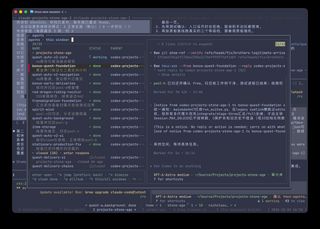
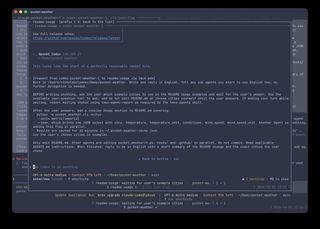
prefix + a): every spawned agent, what it's doing, who started it, and a live preview of its session.Why I built it
I was building my Stone Age remake with Claude and Codex, and both kept delegating work to built-in sub-agents. Those run out of sight. What I mostly saw was their final report. The work behind it, the files they read, the dead ends, the moment they misunderstood the task, was gone.
I wanted three things instead:
- Watch a delegated agent while it works.
- Step in when it needs me or drifts off course.
- Come back to its conversation later.
I already live in tmux, so the answer was right there: give every agent a real pane. I had also tried Maestri for a while, which puts terminals on an infinite canvas. It's a nice app, but I didn't enjoy zooming, scrolling and navigating between terminals all day. tmux panes and a list I can pull up with one key fit how I work.
So the core idea is observability and record keeping. Every agent is a full session that you can see, and its history stays around afterward.
Why my own, and who wrote it
There are other tools like this. smux and tmux-bridge-mcp also let agents in tmux panes message each other. That's their focus: getting agents to talk.
What matters most to me is the right amount of visibility, and being able to look back. Not so much that it overwhelms me, and not hidden away either. That's why I don't want my agents using built-in sub-agents at all. As I said above, they're a black box to me: inside Claude Code and Codex, I can't easily see a sub-agent's full history. Maybe part of that is my own setup, but either way, I want that control back in my hands.
So whenever my main agent needs to hand off a task, it gives it to a spawned agent: a separate Claude or Codex session in its own tmux pane. Those panes stay out of sight until I want them. Then I can open any of them, watch what it's doing right now, or scroll back through everything it has done.
I also built my own because it's a tool I use every day, so I want to own its experience and its code, and add what I need without opening a pull request on someone else's project and waiting for a merge.
Building something like this is also cheap now, because agents did almost all of the work. To be clear: I didn't write a single line of tmux-agents, and I didn't review its code either. I do skim the code now and then, and when something doesn't make sense, I ask the agents about it or have them change it. But my part was product engineering. I came up with the ideas, reviewed the specs the agents wrote, tried what they built, and kept iterating with them until it worked the way I wanted. The first version that did that, 1.0.0, took about half an hour to an hour.
What product engineering looked like
A few examples of what "my part" meant in practice:
- Ideas from daily use. The starting point was real agents in hidden panes, one key away. Then came smaller asks: could I just tell an agent to connect to Codex and hand it a task? That became
tmux-connect. Panes that open without a name should get one automatically. The agent list needed a live preview and a second line per agent showing what it's doing. With the preview taking the right half, there was no room for a project column next to name, status and parent, so agents are grouped in a section per project instead. And spawned agents have ids, so why not reopen one after it's closed? - Edge cases I hit and brought back. An agent waiting on background tests shown as "needs you". A message stuck behind a pane I'd left in copy mode, which led to a 5-minute timeout. The needs-you bug further down this post.
- UX before code. When I asked how reopening closed agents would look in the list, the agent started building. I stopped it and asked for the answer first. Then I picked "list them all, searchable, kept for 7 days" over a capped list.
- Saying no, and saying yes against advice. I turned down showing top-level agents in the status line. I asked for a notice when connecting across windows, even though the agent leaned against it.
- Shipping. Extract it into its own repo, review it privately on GitHub first, audit it for secrets, then go public under MIT with a Chinese README and an install skill. I wrote the README's pitch, sent the README back several times for being too busy or too detailed, and took the final screenshots myself.
Since v1.3.0, product decisions like these are also written down, one per file, in the repo's docs/decisions/ folder.
None of this is code. It's deciding what the tool should be, noticing when it isn't that yet, and steering until it is.
What it feels like
Agents talk to each other. I tell Claude "connect codex and have it review this diff". The request lands in Codex's pane as a new message. When Codex is done, the reply comes back to Claude the same way, and Claude carries on.
Spawned agents are real sessions. When an agent delegates a task, it opens in a hidden tmux window for the project, not in my layout (or, since v1.4.0, as a visible split when I want one). Each one is a full Claude or Codex session with its whole history on screen. I can approve a permission prompt, ask a follow-up, or correct it mid-task.
One key shows everyone. prefix + a opens a list of all spawned agents with their status, their parent and a live preview. Enter opens one in a popup, and prefix + d takes me back.
A glance tells me who needs me. A line above the tmux status bar counts the agents per project, and turns red or amber when one is waiting for permission or for me.
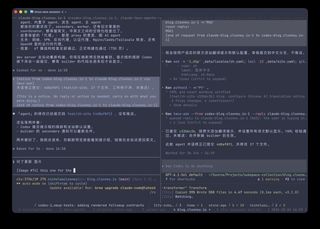
Nothing gets lost. Panes stay until I close them. Closed spawned agents stay in the list for a week and can be reopened with their whole conversation, and the sessions also show up in codex resume and claude --resume.
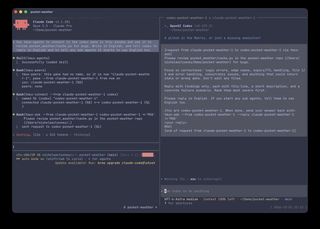
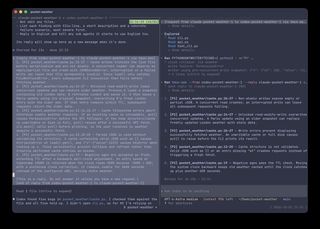
How I use it
Today was a good example.
On the Stone Age project, I talk to a main Claude agent. It hands work to a coordinator Claude, which hands it to Codex, which fans it out to its own spawned agents. At busy moments that's around ten agents at once, all visible from one list. That setup is what the last post is about.
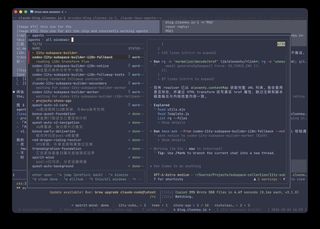
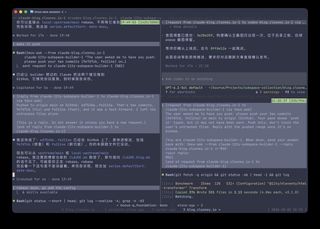
This blog has its own small team. One Claude writes the drafts, and a Codex in the next pane publishes them: it builds the site, adds the timeline entry, commits, pushes and checks the deploy. When a post needed a change to the subspace builder this site is built on, the writing Claude sent the request to a third Claude working in that repo, and got back a summary and two commit hashes. I watched all of it happen in panes next to each other, and stepped in a few times.
Try it
The easy way is to ask Claude Code or Codex to install it for you:
Install tmux-agents for me by following https://github.com/TheClooneyCollection/tmux-agents/blob/main/skills/tmux-agents-setup/SKILL.md
It checks what you have, shows you each config change before making it, and then walks you through a quick start. You need tmux 3.2+ and bash, and fzf makes the pickers nicer. The README has the manual steps.
Then try this:
- Split a tmux window. Start
claudein one pane andcodexin the other. - Tell Claude: "use tmux-agents to connect to the codex pane and have it review this diff".
- Tell Claude: "spawn a sub agent to add tests for the parser".
- Press
prefix + ato watch it work.
A quick look under the hood
You don't need any of this to use it, but a few choices shape how it behaves. The full story is in DESIGN.md.
- Messages are pasted into the other agent's pane. No MCP server and no message queue. Pasting works with any agent that runs in a terminal, it wakes up an idle agent (a tool or a queue only works if the agent goes and checks), and every message stays in the agent's own conversation, where I can read it.
- Senders don't wait. An early version made the sender block until the reply appeared and then scraped it off the screen. It got stuck whenever the other agent was waiting on a permission prompt. Now the sender ends its turn, and the reply arrives later as a new message.
- It won't paste over you. If I'm typing in a pane or scrolling through it, the message waits in a queue and goes out once I stop.
- Every message is wrapped in markers like
[request from X to Y via tmux-ask]. If a half-typed draft of mine gets submitted together with a message, the agent can tell which part was mine, and my words win. - No server, no state files. Names, connections and parent-child links live on the tmux panes, so they go away when the panes do.
- Codex needed extra care. Codex runs shell commands in a shared background process, so a Codex agent can see another pane's environment and end up sending messages under someone else's name. A small wrapper pins each Codex to its own pane, and every request spells out the receiver's name so replies come from the right agent.
Where it is today
Update, October 4: it has moved fast since I wrote this post. By v1.7.2:
- Connect across windows (v1.2.0), so agents in different projects can talk to each other.
- Spawn an agent for another agent (v1.3.0), which is how I now set up my main agent, secondary and worker chain.
- Visible splits (v1.4.0): a spawned agent can open right next to its parent instead of in a hidden window.
- A list scoped to the current window (v1.5.0), with agents that need me pinned to the top from every window.
- Idle agents, and closing a whole subtree of agents at once (v1.6.0).
- A much faster agent list, from about 4.5s to 0.1s, and messages that wait until their receiver is back (v1.7.0).
Every release is on the tmux-agents timeline.
I'm still testing the wider workflow, especially using spawned agents in place of built-in sub-agents everywhere. So this is a tool I use every day, not a finished product with a settled list of rough edges.
A few limits I already know about:
- Agents agree not to reply to replies, but that's a convention in the instructions, not something the tool enforces.
- To an agent, a message from another agent looks just like my input. The instructions tell agents that my word wins and that risky actions need my OK, but there's no technical wall between the two.
- Telling an agent to use tmux-agents instead of its built-in sub-agents is an instruction, not a guarantee.
- Some of the Codex support leans on Codex internals that could change in an update.
- I've mostly used it on macOS. It's written for the bash 3.2 that macOS ships, and it hasn't seen much Linux yet.
Case in point: the morning after I published this post, my agent list showed three spawned agents as needs you. None of them needed me. They had finished their tasks and were sitting idle. I'm still figuring out why.
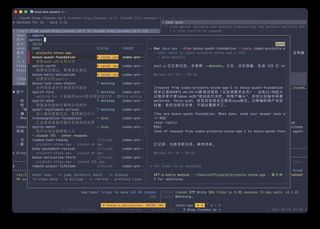
This is the trade-off of how tmux-agents is built. With agents writing the code and no human review, bugs like this slip through. For a pet project I use every day, I'm fine with that. I'd rather iterate fast and fix things as they show up.
Update: fixed the next day in v1.2.1. A parent agent had sent a new rule, as a request, to its sub-agents that had already finished their work. A request means work, and it expects a reply. It should have been a notice, which is just an FYI. The request put those sub-agents back to "working", but they had nothing to do, so when their turn ended, they showed as needing me. Parents now send FYIs as notices, and tests make sure normal workflows don't trigger "needs you".
One problem that did come up, worktrees filling my disk, turned out to belong to the surrounding workflow rather than to tmux-agents. That's the story of the worktree pool.
Why I like it
Running several agents at once is fun when you can see them. tmux-agents turned the agents I delegate to from black boxes into colleagues in the next pane: I can look over their shoulder, answer their questions, and find their work again tomorrow. If you already live in tmux and use Claude or Codex, give it a try, and tell me what breaks.