Understanding @Observable and @State in Swift
This is the first post in my Swift coding series. Future posts will go deeper on SwiftUI architecture, data flow, and patterns I've picked up building real iOS apps.
Swift's Observation framework (introduced in iOS 17 / Swift 5.9) rethinks how model objects communicate changes to SwiftUI. Combined with @State, it gives you a clean, precise reactivity system with far less boilerplate than the old ObservableObject approach. This post walks through both, using a concrete drag-coordination class as the running example.
The example
The HabitDragCoordinator below comes from ProjectDawn, a habit-logging iOS app I've been building. If you're curious about the broader architecture (how it coordinates drag state across separate modules using @Environment), I wrote a full deep dive on that project here.
A coordinator that tracks a drag gesture: which habit is being dragged, where it is on screen, and whether a drop is pending.
What @Observable does
@Observable is a Swift macro. It transforms a plain class into a reactive model by synthesising all the observation infrastructure that previously required manual ObservableObject + @Published boilerplate.
What the macro expands to
For each stored property (draggedHabit, dragLocation, pendingDrop), the macro rewrites the property into a computed accessor backed by private storage and routed through an ObservationRegistrar:
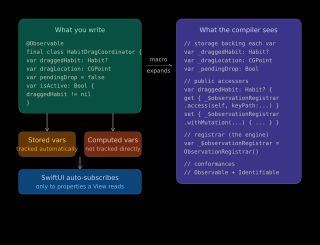
// Synthesised by the macro; you never write this yourself

var _draggedHabit: Habit?
var _dragLocation: CGPoint
var _pendingDrop: Bool

var _$observationRegistrar = ObservationRegistrar()

var draggedHabit: Habit? {
    get {
        _$observationRegistrar.access(self, keyPath: \.draggedHabit)
        return _draggedHabit
    }
    set {
        _$observationRegistrar.withMutation(of: self, keyPath: \.draggedHabit) {
            _draggedHabit = newValue
        }
    }
}
// ... same pattern for dragLocation and pendingDrop
On get, the registrar records that the caller is interested in this keypath. On set, it notifies all registered observers that the value changed. The class also gains conformance to the Observable protocol automatically.
Stored vs computed properties
Stored properties (draggedHabit, dragLocation, pendingDrop) get synthesised tracking accessors. Computed properties (isActive) do not, as they have no storage to back, so no accessor is synthesised.
However, isActive derives its value from draggedHabit. Any SwiftUI view that reads isActive will call through draggedHabit's tracked getter in the process, and will therefore be subscribed to draggedHabit transitively. The subscription is established through access patterns at runtime, not by the compiler statically.
Why this is better than ObservableObject
The old approach required annotating every mutable property with @Published and fired a single objectWillChange publisher on any change:
// Old approach
class HabitDragCoordinator: ObservableObject {
    @Published var draggedHabit: Habit?
    @Published var dragLocation: CGPoint = .zero
    @Published var pendingDrop = false
    // isActive changes don't notify SwiftUI — a separate @Published was needed
}
With @Observable, subscriptions are per-property. A view reading only dragLocation will not re-render when pendingDrop changes. This is a meaningful performance improvement in views that only care about a subset of a model's state.
What @State does
@Observable handles what changed. @State handles keeping the model alive and wiring its changes into SwiftUI's render cycle.
The problem @State solves
SwiftUI views are structs: they are created, evaluated, and discarded constantly. A plain property on a view struct is just a local value that disappears on every re-render:
struct DragView: View {
    // Without @State: recreated fresh on every render, useless
    private var coordinator = HabitDragCoordinator()
    ...
}
@State tells SwiftUI to allocate stable heap storage for the value and keep it alive for the lifetime of the view in the hierarchy. The view struct itself is throwaway; the @State storage is not.
How @State and @Observable work together
struct DragView: View {
    @State private var coordinator = HabitDragCoordinator()

    var body: some View {
        if coordinator.isActive {
            Circle()
                .position(coordinator.dragLocation)
        }
    }
}
@State is responsible for allocating and retaining the HabitDragCoordinator instance. When body runs, @Observable's getters register this view as an observer of whichever properties are accessed: here, isActive (via draggedHabit) and dragLocation. When either of those properties changes later, SwiftUI re-evaluates body and updates the UI.
Neither does the other's job. @State without @Observable gives you a stable instance but no fine-grained change tracking. @Observable without @State gives you tracking but the instance gets recreated on every render.
When to use @State
Use @State when the view creates and owns the instance:
@State private var coordinator = HabitDragCoordinator()
If the instance is created upstream and passed down, you don't use @State. A plain let property works, because @Observable's tracking is on the object itself, not the reference:
struct DragOverlay: View {
    var coordinator: HabitDragCoordinator  // plain let — still reactive

    var body: some View {
        Circle().position(coordinator.dragLocation)
    }
}
For dependency injection across the view hierarchy, use .environment() and @Environment:
// In a parent view
.environment(coordinator)

// In a descendant
@Environment(HabitDragCoordinator.self) private var coordinator
This replaces the old environmentObject / @EnvironmentObject pair.
The rule of thumb: if you write = HabitDragCoordinator(), use @State. If someone hands it to you, you don't.
Summary
@Observable |
@State |
|
|---|---|---|
| What it does | Synthesises per-property change tracking | Allocates stable storage in SwiftUI |
| Where it lives | On the model class | On the view property |
| What it replaces | ObservableObject + @Published |
@StateObject (for reference types) |
| Granularity | Per-property subscription | N/A (manages lifetime) |
Together they form a clean ownership model: @State says "this view owns this object", and @Observable says "tell SwiftUI exactly which properties this view depends on."