From Drafts to a Digital Garden in Subspace Builder
Part of a series
- Subspace Builder Series (8 of 8)
Subspace Builder has changed a lot since the last roundup. From v1.13.0 through v1.20.0, the project picked up better editorial workflows, better code presentation, and better ways to navigate a growing site. Here is the short version of the releases that matter most.
Drafts Stay Visible in Dev and Hidden in Production (v1.13.0)
The first big quality-of-life improvement after v1.12.0 was drafts support. Any post with draft: true in its front matter is now collected into a dedicated /drafts/ page, which makes unfinished work easy to review while the local dev server is running.
That sounds small, but it cleans up the writing workflow a lot. Instead of juggling temporary files or wondering which posts are safe to publish, you can keep real in-progress content in the repo and still browse it like the rest of the site. The important part is that production stays clean: npm run build and npm run prod still exclude draft content from the published output.
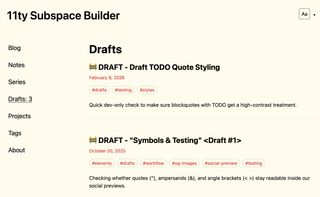
Drafts page in the dev server showing unpublished posts collected in one place.
Code Blocks Finally Match the Active Theme (v1.14.0, v1.19.0, v1.20.0)
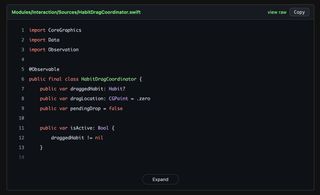
This release range also made code presentation feel much more intentional. Regular fenced code blocks and GitHub embeds now share a GitHub-inspired visual language, and they adapt automatically when the site theme changes. Light themes stay bright, darker themes flip the code surfaces automatically, and the latest polish in v1.20.0 improves dark blocks and mobile embed behaviour.
The GitHub shortcode remains one of my favourite additions here because it keeps code examples tied to the source of truth. Instead of pasting stale snippets into Markdown, the post can render a real file or line range directly from GitHub, complete with highlighting, line numbers, copy actions, and collapsible long snippets.
npm run dev
npm run prod
npm run build
Top row: regular code blocks. Bottom row: GitHub embeds.
| Light Theme | Dark Theme |
|---|---|
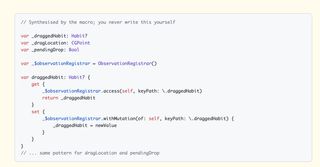 |
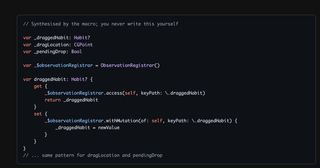 |
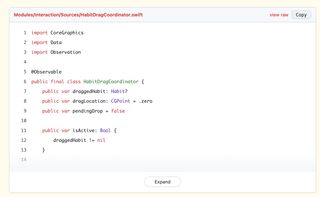 |
 |
Is this a terminal?
On top of that, Subspace Builder now ships with a terminal theme as well. It carries the green-on-near-black look through the rest of the site, and it fits code-heavy posts especially well because the snippet surfaces and GitHub embeds stay consistent with the overall palette.
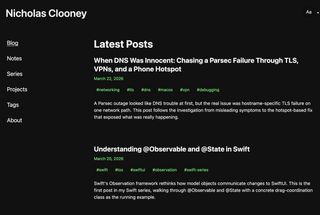
Terminal theme applied across the site.
Docker Makes Local and Shared Previews Easier (v1.14.0, v1.15.0)
Running the site no longer has to depend on a host Node install. The project now includes Docker Compose definitions for both development and local production preview, with separate services, mounted working directories, named volumes, and predictable ports. That makes it much easier to get a working environment quickly or to keep the site running behind a shared reverse proxy.
The setup also grew a little sharper after the initial release. Restart policies were added, the compose files were cleaned up, and there is an edge override for environments where another service such as Caddy handles ingress. In practice, that means you can use the builder locally, on a shared machine, or behind a home-lab style setup without rewriting the project structure.
Tags Are Grouped by Real Usage Now (v1.16.0)
The tags page also got smarter. Instead of dumping every tag into one long alphabetical list, /tags/ now groups them by how many posts use each tag. The busiest topics rise to the top, which makes the page feel more like a content map and less like a raw index.
That change matters more as the site grows. Once a blog starts collecting enough entries, the useful question is not only "which tags exist?" but also "what do I write about the most?" Grouping by count answers that immediately.
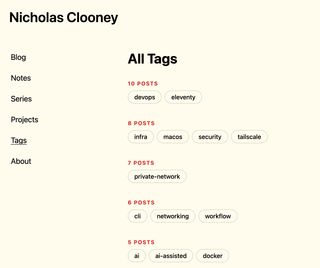
Tags page grouped by the number of posts using each tag.
Series Pages Turn Related Posts into Reading Paths (v1.17.0)
Another major addition is the new /series/ section. Series pages let us curate a list of related posts with an intro, keep them in a deliberate reading order, and give readers a cleaner path through a topic than simple reverse-chronological browsing.
The detail pages are especially nice because they are not locked to one order. A series can start in a hand-picked curated sequence, then switch to reverse order, oldest first, or newest first on the page itself. Posts also link back to their parent series, so readers can jump from one article into the bigger collection without having to hunt for context.
This is also how the Subspace posts are now organized: instead of feeling like isolated release notes, they can read as one continuous build log.
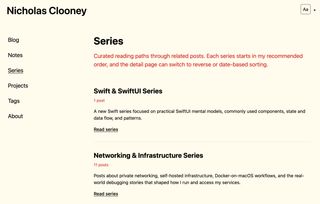
Series page showing a curated collection of related posts.
Pagination Was Inevitable Once the Post Count Grew (v1.18.0)
The homepage finally gained build-time pagination as well. Page one stays at /, later pages live under /page/2/, /page/3/, and so on, and the navigation adds clear previous and next links with a page indicator.
That was a necessary change more than a flashy one. blog.nicholas.clooney.io now has enough content that loading everything into a single home page stopped being a good default. Pagination keeps the front page lighter while still letting the archive grow naturally.
Notes Push the Site Toward a Digital Garden (v1.19.0)
The newest content surface in this stretch is Notes. There is now a dedicated /notes/ page and a matching collection for shorter pieces that do not need to be full blog posts. That opens up a better space for references, fragments, experiments, and the smaller ideas that are useful to keep public even when they are not "finished articles."
This is probably the clearest step toward making the blog feel like a digital garden instead of only a release log. Posts can stay long-form and structured, while notes give the site room for quicker learning in public. The addition of note-aware OG image handling means they also fit cleanly into the rest of the publishing pipeline.

Notes page showing the digital garden style collection.
Where Subspace Builder Stands at v1.20.0
Taken together, these releases move the project well beyond a simple Eleventy starter. It now has a safer drafting workflow, stronger code presentation, container-friendly local setups, better discovery through tags and series, pagination for scale, and a second content mode through notes.
That is a solid stretch of releases. If you are picking up the builder again after v1.12.0, v1.20.0 is a much more complete publishing toolkit.